
requires max for live
Stop Browsing Start Describing
Thousands of Ableton sounds plus your own folders searched by how they sound, not what they're named.

Download For Mac
Requires MacOS +11 with Apple Silicon

Download For Windows
Requires Windows 10/11 (64-bit)
Jamu · Ableton Session
"Load a warm, dusty lo-fi hi-hat to Track 3 and a punchy 808 kick to Track 1."
J
Jamu
🥁
✓ Loaded
🎵
✓ Loaded
Both loaded. Want something else?
14,000+
Ableton built-in sounds
fully searchable by description
1 line
to find and load a sample to any track in your session
Take Lanes
Load options side by side and compare in Ableton
The problem
Finding Samples
Shouldn't take this long
The sound is in your library. Getting to it is the problem.
📁
Too many presets, no clear path
Ableton's browser is organized by file structure, not by how sounds feel. "Warm" and "dusty" aren't folder names. You end up opening everything.
▶️
Preview until you forget
🔄
Experimenting takes too long
Most producers cycle through the same 200 sounds because discovery requires patience. The library is huge. The process to explore it isn't.
How it works
0
Load the Jamu Max for Live device
Disclaimer: This feature is available only for Suite and Max for Live users. For full Jamu capabilities load the Jamu M4L device. Open User Library → Jamu and drag the Jamu M4L device onto any track.
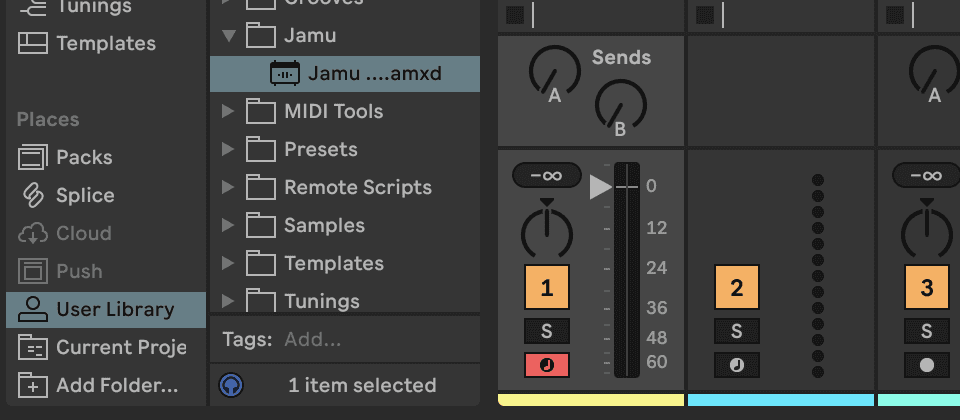
1
Describe the sound you want
Tell Jamu what you're after. The feel, the character, the instrument. No filenames, no folder paths. "Warm, dusty lo-fi hi-hat for Track 3" is enough. Jamu doesn't need structured input.
Jamu · ABLETON session
"Load a warm, dusty lo-fi hi-hat to Track 3 and a punchy 808 kick to Track 1."
2
Jamu searches and loads the best match
Jamu searches Ableton's full built-in library of 14,000+ sounds plus any local folders you've added. It finds the closest match and loads it straight to the track you specified. No dragging, no drop zones, no previewing.
Jamu · READING session
J
Jamu
◎
Searching 14,000+ sounds - matching mood, texture, instrument type
◈
Track 3: HiHats/Dusty_Lofi_Open_03.wav loaded
◈
Track 1: Kicks/808_Sub_Punch_Tight.wav loaded
Both loaded. Want alternatives on either track?
3
Compare options with take lanes
Not sure it's the right one? Ask for a few alternatives and Jamu loads each to a separate take lane on that track. Switch between them directly in Ableton to hear the difference in context. No re-searching. Pick the one that fits and move on.
Jamu · SWAPPING PRESET
"Give me 3 kick options on Track 1 to compare."
J
Jamu
◈
Take 1 (active) — Kicks/808_Sub_Punch_Tight.wav
◈
Take 2 — Kicks/Boom_Bap_Deep_02.wav
◈
Take 3 — Kicks/Sub_Thump_Loose_05.wav
3 options on Track 1. Switch takes in Ableton to compare.
How Jamu works
Describe the character.
Jamu finds the effect.
🔍
Semantic search
Jamu understands mood, texture, and feel, not just filenames. "Warm and dusty" maps to the right sounds even if nothing in the library is named that way.
📚
Full library coverage
All of Ableton's built-in sounds, plus any local folders you've added. One search covers everything, not just what's on screen.
⚡
Loads straight to the track
Tell Jamu which track you want it on. It finds the match and drops it in. No dragging, no drop zones, no confirming. It's just there.
🎚
Compare with take lanes
Ask for a few options and Jamu loads each one to a separate take lane. Switch between them in Ableton to hear the difference. Pick the one that fits.
Describe sounds the way you actually think about them
warm lo-fi hi-hat
punchy 808 kick
vinyl crackle
tight room snare
airy open hat
deep sub bass
crispy clap with reverb tail
dusty boom bap kick
bright shaker
dark pad texture
punchy transient snare
filtered old-school bass
glitchy percussion loop
soft brush snare
aggressive distorted kick
Questions
Common questions
How does Jamu search Ableton samples by description?
Can Jamu search my own sample folders, not just Ableton's library?
What kinds of descriptions work for sample search in Jamu?
Can I load multiple samples at once?
Keep exploring
More features
Feature
MIDI Generation
Describe chord progressions, melodies, or basslines. Jamu writes theory-correct MIDI straight to your clip.
Feature
EQ & Compression
Muddy low mids, too much presence, sidechain routing. Describe the sound, Jamu picks the device and loads it.